![mirro_logo_pnk_slogan.png]](https://help.mirro.io/hs-fs/hubfs/mirro_logo_pnk_slogan.png?height=40&name=mirro_logo_pnk_slogan.png)
Depending on your company’s setup, notifications can alert you to things like:
- check-ins and feedback activity;
- recognition and community interactions;
- leave requests and approvals;
- OKR updates;
- document-related actions;
- reminders for tasks that need your attention;
Where can you receive notifications
You may receive notifications in one or more of these places:
- Mirro app;
- by email;
- through connected tools, depending on your organization’s setup;
The exact notification channels available to you depend on your company settings and the integrations your team uses.
Why notifications may look different from one user to another
Notification behavior can vary based on:
- your role and permissions;
- the modules your company uses;
- whether a workflow requires your action;
- your personal notification preferences, if these are available in your setup;
For example, a manager may receive approval-related alerts that other team members do not see. A basic user can receive a notification letting them know that their leave request was approved.
What to do if you are not receiving notifications
If you expected a notification and did not receive it, check the following:
- Make sure the relevant action was completed in Mirro;
- Check whether the notification appears inside the platform (the notifications icon at the top right of the page);
- Review your email inbox and spam folder;
- Confirm that your email address is correct;
- Check whether your company has disabled or limited certain notification types (you can ask your Mirro admin);
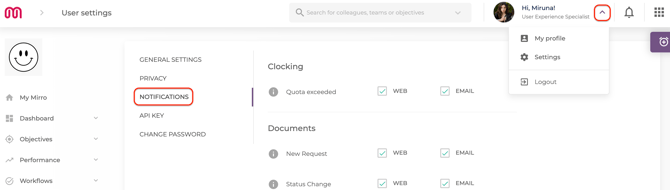
- Review your notification preferences (click on Settings- Notifications):
If the issue continues, contact your Mirro admin and include:
- what type of notification you expected;
- when you expected it;
- whether you checked both Mirro and email;
- whether the issue affects only you or other users as well;
What to do if you are receiving too many notifications
If your notifications feel too frequent, review your available notification settings first (click on Settings- Notifications). If your setup does not allow personal control for that notification type, your Mirro admin may need to adjust the configuration.