![mirro_logo_pnk_slogan.png]](https://help.mirro.io/hs-fs/hubfs/mirro_logo_pnk_slogan.png?height=40&name=mirro_logo_pnk_slogan.png)
Closing a month in Shifts & Schedule freezes that month's shift data so it stays exactly as it was, even if shift types are changed or deleted later. This is the same Preliminary Payroll month status used elsewhere for payroll, so closing and reopening here is tied to the same rules around time off and work away requests. Only the Preliminary Payroll access right (company wide or per location) can close or reopen a month.
Where to find it
Access the Leave & Attendance module, select Shifts & Schedule, and use the Close month or Reopen month button near the top of the page. The button only appears for months that have already started; you cannot close a future month.

Closing a month
1. Select Close month.
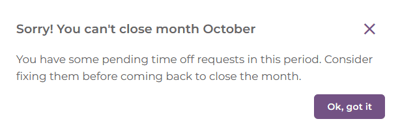
2. If the month has any time off or work away requests still pending approval, Mirro stops you with a message telling you the month cannot be closed yet, and asks you to resolve those requests first.
3. Once there are no pending requests left, confirm the close. Mirro tells you that employees will no longer be able to add time off or work away requests for that month.
4. After closing, every shift assigned that month, and each location's default shift, is locked in as it was at that moment. The grid for that month becomes read only for everyone, no matter their access rights.
💡 Tip: Closing a month also takes a snapshot of each assigned shift's name, color, times, and break. If you later edit or delete that shift type, the closed month still shows exactly what each employee actually worked.
Reopening a month
1. Select Reopen month.
2. Mirro tells you that employees will be able to add time off and work away requests for that month again.
3. Once reopened, the grid for that month becomes editable again. The shift snapshots taken when the month was closed are not erased; if you close the month again later, only the shifts you changed in the meantime get a new snapshot.
⚠️ Warning: Reopening a month lets employees submit new time off and work away requests for a period you may already be treating as final for payroll purposes. Reopen a closed month only when you genuinely need to make a correction.
FAQ
Q: Can I close next month in advance?
A: No. The Close month option only appears once a month has started; future months cannot be closed ahead of time.
Q: If I edit a shift type after closing a month, does it change that closed month too?
A: No. The closed month keeps the shift's values from the moment it was closed. Only open months reflect later changes to a shift type.
If you cannot close a month, check for pending time off or work away requests first. If you need more details, contact us at support@mirro.io.