![mirro_logo_pnk_slogan.png]](https://help.mirro.io/hs-fs/hubfs/mirro_logo_pnk_slogan.png?height=40&name=mirro_logo_pnk_slogan.png)
If your company uses shifts or variable working hours, My Schedule is where you check what you are working and when. It shows the shifts assigned to you, your total scheduled hours for the month, and any leave you have booked or requested, all on one calendar.
Where to find it
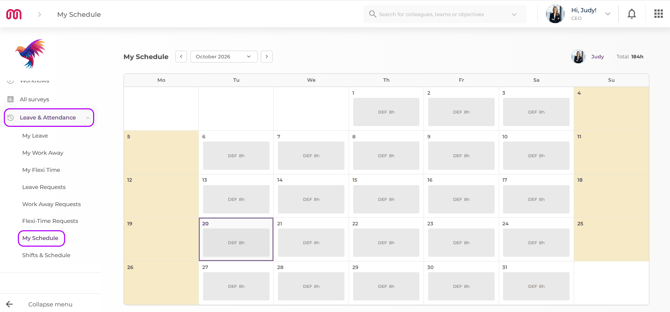
Access the Leave & Attendance module and select My Schedule.
Reading your calendar
1. Open the month selector at the top of the page. Click it to see a list of years, click a year to see its months, then click a month to select it.
2. Check your row for the month. Each day shows the shift assigned to you, or your location's default working hours if no specific shift has been assigned to that day.
3. Check the Total figure for your scheduled hours for the month. This is your scheduled (or default) hours, minus any leave.
4. Scroll through the month to see your leave days. Days you have booked off, including requests that are still pending approval, use the same color as weekends and public holidays.
5. Hover over any day to see its full details in a tooltip, including the exact start and end time of your shift.
💡 Tip: You can look back as far as the month your company joined Mirro, and forward up to two years from today. If a shift includes a break, the break is already subtracted from the hours shown. For example, a 9 AM to 6 PM shift with a 60 minute break shows as 8 hours.
FAQ
Q: Why does my schedule show hours for a day I was not specifically assigned a shift?
A: When no shift has been assigned to you for a day, Mirro shows your location's default working hours for that day instead.
Q: Can I see my colleagues' schedules from here?
A: No. My Schedule only shows your own row. If you need to check someone else's schedule, ask your manager or your company's Shifts & Schedule administrator.
Since pending and approved leave already shows up next to your shifts, My Schedule is also a good place to plan around time off. To add a new request, see How to manage your leave balance. If you need more details, contact us at support@mirro.io.