![mirro_logo_pnk_slogan.png]](https://help.mirro.io/hs-fs/hubfs/mirro_logo_pnk_slogan.png?height=40&name=mirro_logo_pnk_slogan.png)
Where to find the options?
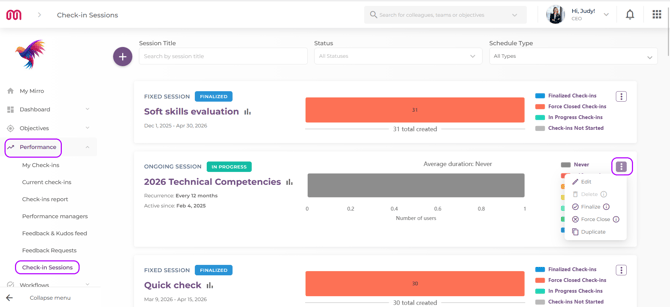
Both options are available at the level of any active check-in session. Go to the module Performance in the main navigation, the Check-in session section and access More options, as seen in the screenshot below:
Understanding the two options
Mirro now offers two distinct ways to end a session, and it is important to understand the difference before you act — because each one has a different impact on open check-ins.
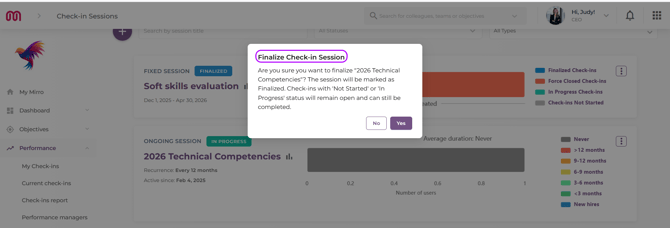
Finalise: Use this when you want to stop the session from generating new check-ins, but you are happy for employees and managers to finish any check-ins that are already in progress. When you finalise a session:
- No new check-ins will be triggered;
- Check-ins that are already started — whether in draft or shared — remain open and can still be completed;
- The session moves to the status Finalised;
This is the right choice when you want to close the session officially, but some people are still mid-process and you want to give them the chance to finish.
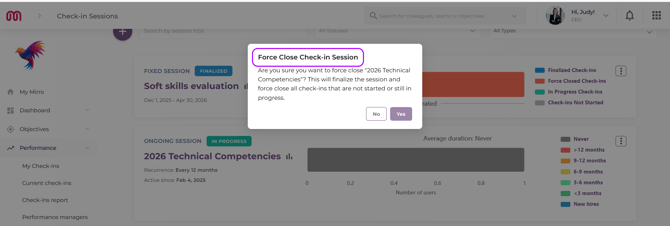
Force Close: Use this when you want a clean, immediate end to everything. When you force close a session:
- No new check-ins will be triggered;
- All check-ins that are currently open, whether not yet started or in progress, are closed immediately and cannot be completed
- The session moves to the status Finalised with all check-ins locked;
This is the right choice at the end of a cycle when you need a definitive cut-off and want no outstanding open check-ins left behind.
Options available depending on the status:
|
Session status |
Finalise |
Force Close |
|---|---|---|
|
Draft |
Not available |
Not available |
|
Active |
✅ Available |
✅ Available |
|
Finalised |
Not available |
✅ Available |
💡 Tip: The option Force Close remains available even after a session has already been finalised. This means that if you finalise a session and later decide you want to close the remaining open check-ins, you can still go back and do that without having to take any other action first.
What happens when a manager changes during an active session?
When someone's performance manager changes while a check-in is already in progress, Mirro now handles the transition automatically — no check-in gets stuck in a frozen state as a result of a manager change alone.
Here is what happens depending on where the check-in is in its process:
If the check-in is in draft — the new manager picks up where the old one left off. They complete the share & discuss and finalise steps, regardless of whether the employee has already shared their answers.
If the check-in has been shared by the old manager — the old manager's responses are preserved, and the new manager can only complete the finalise step. The employee has already seen those responses, so nothing is lost.
In both cases, the employee's side is not affected. If they have a draft in progress, they can continue working on it. If they have already shared their answers, they simply wait for the new manager to finalise.
What happens when an employee leaves the company?
If an employee leaves while a check-in is open, the check-in does not close automatically at that moment. It will close at the end of the session, or it can be force closed manually by an user who has one of the following access rights: Company Performance Admin, Department Performance Administrator and/ or the Check-in Session Publisher manager, at any point before then.
FAQ - there isn’t a single article without this section, right? And on top of that, it’s super useful.
-
Can I force close individual check-ins without closing the whole session?
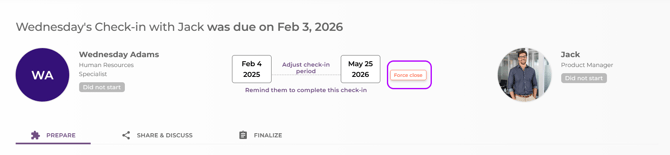
Yes. A user that has one of the following access rights: Company Performance Admin, Department Performance Administrator and/ or the Check-in Session Publisher, can force close individual check-ins at any time, independently of the session status. This is especially useful when a manager has been deactivated and their check-ins need to be resolved.
The option is available at the level of the performance check-in, as it can be seen in the screenshot below:
-
If I finalise a session and there are still open check-ins, can I go back and force close them later?
Yes. The Force Close option remains available on a finalised session, so you can close any remaining open check-ins whenever you are ready.
-
What happens to a check-in if the performance manager's account is deactivated?
Mirro will automatically look for the current performance manager assigned to the employee and update the check-in accordingly. If no manager is currently assigned, the check-in will remain open until a manager is assigned, at which point it can be picked up and completed.